
A New Look for Enpass, Built Around You
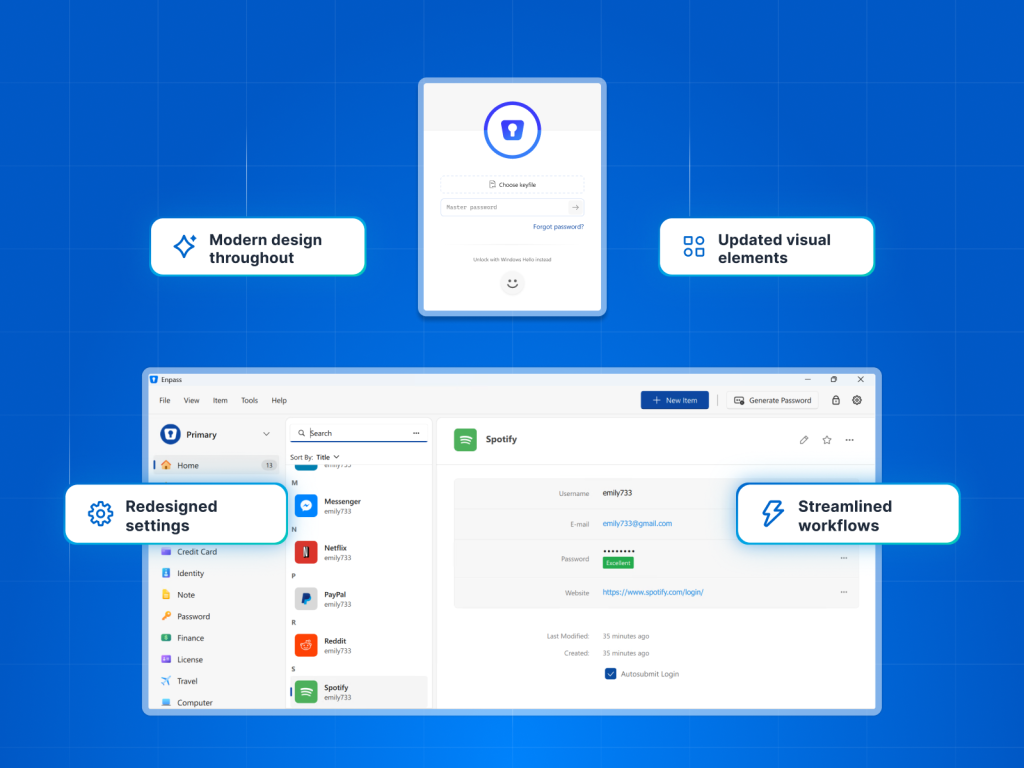
A Fresh New Look. The Same Enpass You Trust.
At Enpass, every improvement we make is driven by a single goal: to make managing your digital life easier. Guided by user feedback, we’ve been steadily refining the Enpass experience to be more intuitive and cohesive at every step.
We’re an organization that is constantly looking to refine and improve user experience. In November 2025, we introduced the liquid glass design for the Enpass app on iOS 26. In tandem with that, the Enpass desktop app experience on Mac and Windows has been fully refreshed with a modern interface that feels cleaner, smoother and refined. Everyday interactions are now simpler and more streamlined all while preserving the familiar ways of working you already rely on.
Designed to Feel Effortless
Every screen and every interaction has been refreshed. For you, this means:
A cleaner start, every time – the refreshed master password screen and add-item experience now feel smoother and more intuitive from the very first click.
Modern design throughout – refined layouts, icons, and visuals across the sidebar, item lists, item details, autofill, password generator and more.
Settings, redesigned for better navigation – more spacious and less cluttered, so it’s easier to find what you need.
Streamlined actions – common tasks like adding items and importing data now take fewer steps.
Sharing, simplified – manage all your vault sharing in one space. View vaults shared by you and what’s been shared with you, and update access rights on the spot.
Everyday Tasks, Simplified
So what does this mean for users? Beyond the visual refresh, Enpass now makes everyday tasks feel lighter and more streamlined. We’ve created a more intuitive experience, be it adding items, updating details and importing data. This means you spend less time searching and more time getting things done.
Ready for You to Explore
Experience the new Enpass in version 6.12.0 for all your password management needs. You can download the latest desktop version here. To learn more, explore the release notes or browse our support documentation https://help.enpass.io.